
Manage document templates for your organisation
The platform ships with a set of master document templates (employment contracts, warnings, PIPs, etc.). You can use them as-is, or create organisation templates that override the masters with your own wording, fields, and prefill rules.
Master vs organisation templates
- Master templates. Maintained centrally by the platform team. They cover the standard set of HR documents Australian SMBs need. You can read them but not directly edit them.
- Organisation templates. Yours, fully editable. When you create one, the platform uses your version instead of the master for that document type.
This means you can replace the standard contract with your own preferred wording, or add fields specific to your business, without losing the master as a fallback.
Create or edit an organisation template
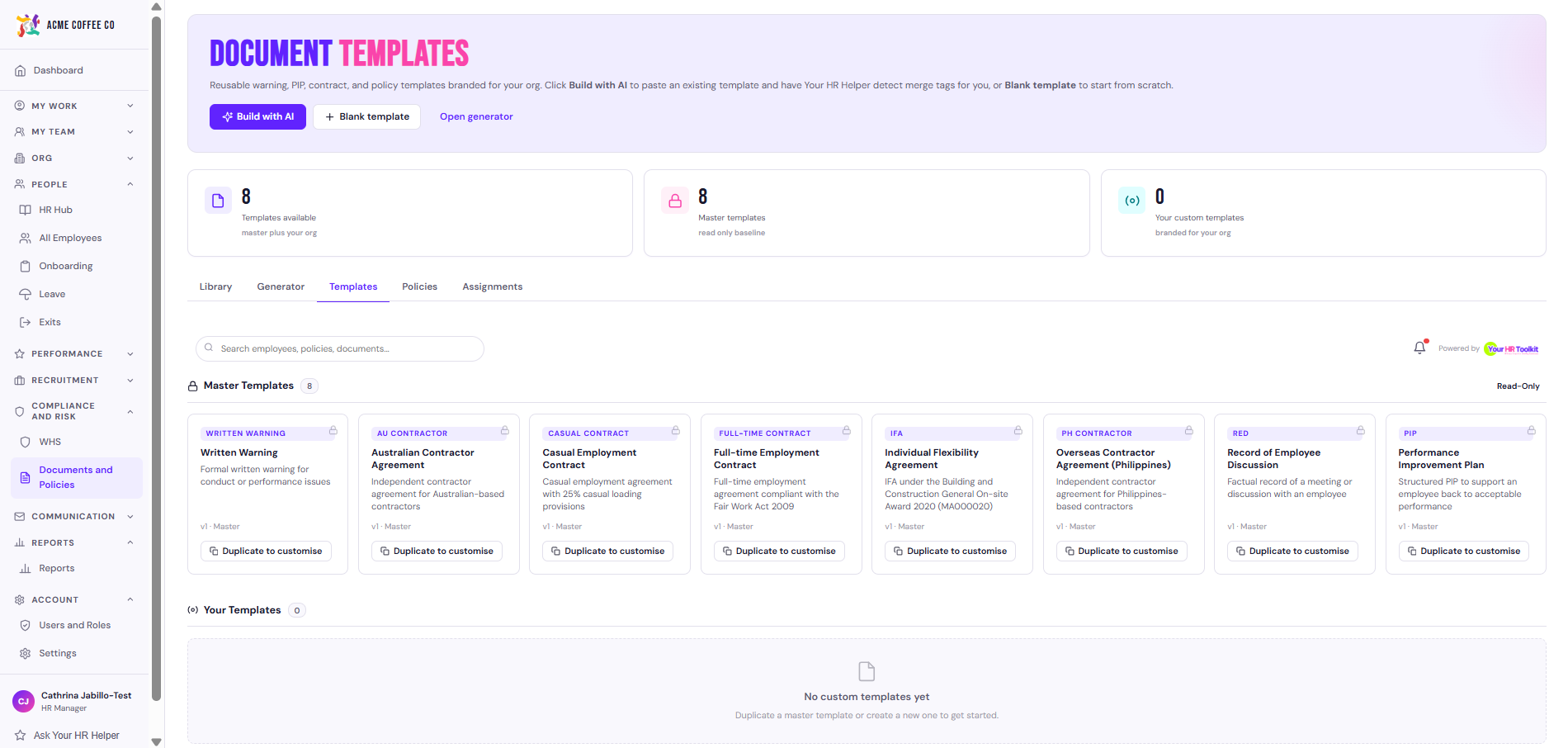
The fastest way to create a new template is the AI Document Template Builder: paste an existing document (a contract, policy, or letter you already have) and the builder turns it into a reusable template with merge tags and AI fill spots auto-detected. See Use the AI document template builder for the full walkthrough.
If you’d rather build a template from scratch field by field, follow the manual steps below.
- Open the templates area (accessible to admins from the document generator).
- Pick a master template to clone, or create a new template from scratch.
- Set:
- Title. What the template is called.
- Document type. Which document category this template represents (warning, PIP, full-time contract, casual contract, IFA, contractor agreement, etc.).
- Category. Disciplinary, performance, employment, compliance, or other.
- Define the form fields that the document generator will ask for when this template is used.
- Define the template body — the document text itself, with merge tags where employee data should be filled in.
- Save.
Once saved, the next document generated under this type uses your template.
Form fields
Each field in the form has:
- Type: text, textarea, select (dropdown), date, or number
- Label: what the admin sees when generating
- Required: tick if the field must be filled
- Prefill source (optional): pull a value automatically from employee or organisation data
Available prefill sources
The platform can prefill from:
- Employee: full name, first name, last name, job title, employment type, start date, work location, modern award name and classification, manager name
- Organisation: business name, ABN
- System: today’s date
Prefill makes generation faster: the admin only types the fields the document genuinely needs them to type, and everything else fills in automatically.
Available merge tags in the body
Anywhere your template body uses a merge tag (e.g. {{employee_name}},
{{start_date}}, {{org_name}}), the platform substitutes the actual
value when generating. The template editor shows the available tags
and what each one means.
Test a template before going live
Before relying on a new template for real:
- Generate a document for a test employee.
- Review the output.
- Adjust the form fields and template body until the result matches your expectation.
- Have a relevant person (HR lead, legal advisor) review the template text once, so subsequent generations don’t need re-review.
Versioning
Edits to organisation templates apply to future generations only. Documents already generated stay as they were at generation time, with the version of the template they used.
When to keep using the master
If your organisation has no specific reason to deviate from the master template, just use the master. Less to maintain, and the platform team keeps masters reasonably current as Australian HR practice evolves.